
As of 13 June 2023, we need to use this template in sending our orders to Kaleidoscope. Additionally, Kaleidoscope will no longer drop ship spare parts.
Review the order details (Shipping details, Payment status, Shopify Notes, Notes in the draft, Fraud analysis, Shipping, Inventory allocation, Fulfilment location)
Important Note:
For orders with “Payment Pending” status (Bank Deposit), follow this process.
For Medium / High Risk Order, follow this process.
Search for the order number in Freshdesk to see any related concerns or tags about the order. (Ex. customer requesting to change the address, add ATL instruction, tags on special instructions before processing the order)
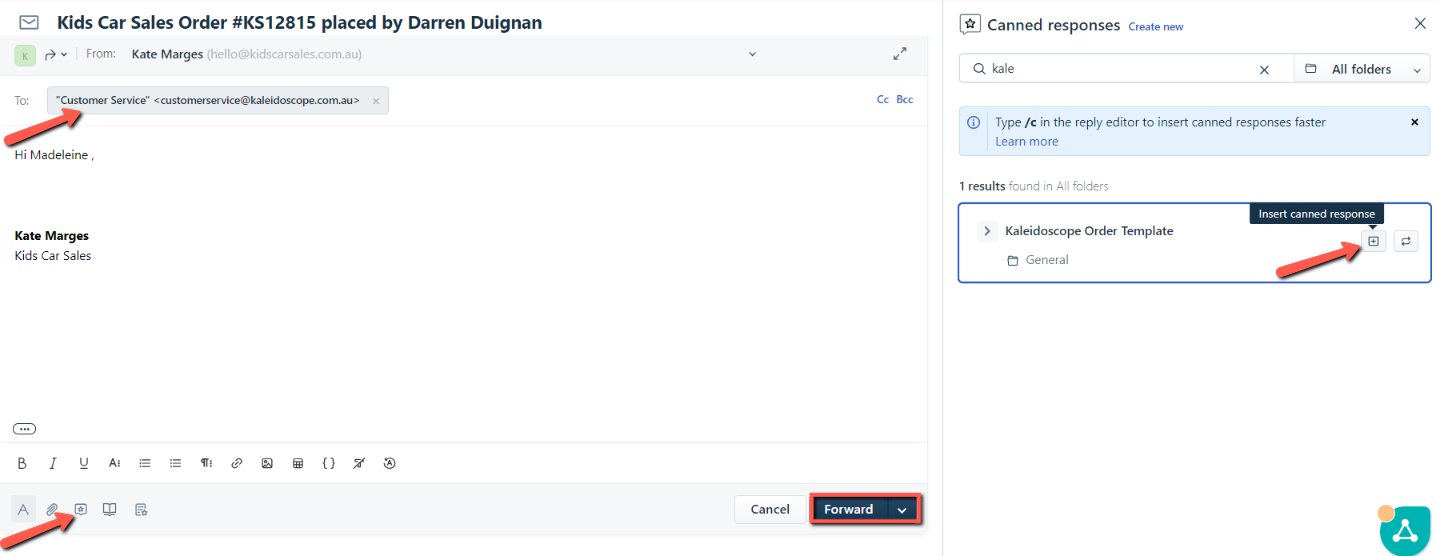
For ride-on orders - Forward the Order ticket to Kaleidoscope via email using the details from the store spreadsheet. Use the FD Canned Response.
For spare parts order - Forward the Order ticket to Accounts@tyreswing.com.au and ask to send the order number once processed. Accounts will order it via the Kaleidoscope website without logging in.
Update the FD tags and status accordingly. Order tickets marked on any waiting status will automatically reopen in 2 days.
Review if the order details are correct once you receive the invoice. If everything is correct, forward the Order ticket to Accounts@tyreswing.com.au. Add a short note “Pending Payment” so, Accounts can initiate the payment. You can also send a screenshot of the payment so the order can be released sooner.
Fulfil the order once we have the tracking number from the supplier.
Important Note:
If the order cannot be fulfilled yet (Ex: Back Order, OOS) include the ETA (dd/mm/yy) in the Shopify notes section. We should follow up and add Shopify notes every time the order ticket reopens explaining why it’s not fulfilled yet.
Once the order has been fulfilled, update the FD tag to “Complete/Shipped” and the FD status to “Resolved.”